Facebook Tricks

1)How to Send Free SMS via Facebook
2)How to Send Profile Pics in Facebook Chat
3)How To Download Facebook or Youtube Videos Without Any Tools
etc...

Computer Tricks

1)Computer Maintenance tips for keeping it healthy
2)Top 20 Tips To Keep Your System Faster
3)Increase your RAM by Increasing system speed
etc...

Mobile Tricks

1)15 General Tips and Tricks for Nokia Users
2)Save your Battery Charge
3)Play all file format in your mobile using core player
etc...

2012 Antivirus Softwares

1)Full Version Panda Internet Security 2012 with Serial Key
2)Download Bitdefender Total Security 2012 Beta
3)Download Avast 6 Home Edition 1 Year License Serial Key
etc...

Firefox Tricks

1)Top 10 Firefox Hacks and Tricks
2)Best Funny Firefox Tricks
3)Ultimate List Of Firefox 4 Tips; Tricks And Hacks You Should Learn Right Now
etc...

Showing posts with label Blogger Tricks. Show all posts

Wednesday, 7 March 2012

Dynamic Views Gadgets Officially Released!


Six extremely beautiful dock style gadgets have been introduced for blogger dynamic views which are a set of templates first launched on  September 20111, with interactive user interface that provides a user with a complete different experience in variety of new ways.  Its built with the latest in web technology (AJAX, HTML5 and CSS3). The widgets display in a different format. Instead of occupying a space at your sidebar, the widgets appear in a dock that slides in and out when a visitor hovers mouse cursor on it. Lets take a tour of dynamic views new added factory tools!


Live Demo

List of New Gadgets For Dynamic Views

At present 6 basic gadgets are made compatible with dynamic views, which are:
  1. Followers (Google Friend Connect)
  2. Blog Archive
  3. Author Profile
  4. Labels
  5. Subscribe (Automatically present)
  6. Link List
These widgets can not be added to traditional templates directly though we will find a way to create custom dock view widgets for blogger very soon.

How to Install these gadgets?

No installation or coding required at all. These widgets can be added to your templates automatically if you are running anyone of the seven dynamic view layouts. By default only the subscribe widget is present and other widgets needs to be added via Design tab. . These gadgets can be added, removed and customized by going to Blogger > Design > Page Elements. Simply edit them from layouts tab as you normally do by clicking on add a gadget and then choose a widget of your choice. Once you save the widgets and view your blog, you will find it added automatically to the sidebar. 

Pros and Cons of Dynamic Views

Please read the following post to know why we don't recommend use of dynamic views for those who wish to make a living online with their blogs despite the fact that these new templates are being used by over one Million users in blogger community and with 50% faster load time.

How Will your Blog look in Dynamic View?

Watched the video below to know what exactly are the classic, magazine, sidebar etc. new terms often used for Dynamic views. To see a special view of your very own blog just use the following link format:
http://www.mybloggertricks.com/view/sidebar
Simply replace our blog URL with yours and by changing the word sidebar to classic, snapshot, timeslide, mosaic or magazine . A total of seven views for your very own blog. No settings required just use the link above to test it.

Need help?

I hope this news brings a smile on your faces as most of you were continuously asking for such widgets. Its time to dress up your blogs and equip them even further. Let me know if you needed any help. Peace and blessings pals! :)

Why Your Blog Makes No Money? Part 3

why blog makes no money?

One of the question that almost everyone starts asking after working hard for days and nights by writing tons of articles online. Why should your blog make money? Why should advertisers sponsor it? What have you got in your content that will provide potential return to advertisers? Why should someone buy an ad spot on your blog? Are you receiving good page views? What is handsome traffic in numbers for you? Do you have readership power? How many people actually re-share your content? How active are your daily readers, do they shop online? Which country brings you a lot of traffic? Forget about PageRank, whats your Alexa? A lot of questions that can be asked from people who just stepped into blogging and all these questions have logical answers. I have observed new enthusiastic people rapidly turning their attention to this beautiful art of writing and earning online. Yes without any doubts, blogs do make money and they drive hell lot of traffic but if that is the case then why aren't everyone becoming a millionaire? The secret lies in a sensible traffic formula and understanding search engine optimization strategies, the sooner you know it, the better it gets.

Note: These series in no way highlight me as a Pro Blogger. I prefer the title of a peanut blogger and would remain and live so always.
Pro Blogging SERIES
Part3: Why Your Blog Makes No Money?
Part4: In Progress..

Internet Users Turning Into Content

People everywhere around the world has realized the importance of education. Literacy rate is growing at an alarming rate producing brilliant authors every single second. Every good writer wants to turn his writing skills into cash. Some try their luck as freelancers whilst others in search of their own unique identity choose blogging as a long term goal. Netcraft, which is an Internet monitoring company, reported in 2007 that there were 106,875,138 Web sites with domain names and content on them in 2007, compared to just 18,000 Web sites in August 1995. Billions of webpages are published every day within 24 hours, making the competition online tougher every second. Can you expect to survive as a new content publisher amongst already existing giants? 
Yes you can! Internet traffic is like a hungry whale eating everything coming in its way. The only difference is that are you providing a smooth path for search engines to come and value what you publish? I guess I have asked enough questions, its time to solve some mysteries and bust some widely popular myths online.

Three Fundamental Tips To Succeed As Blogger

(1) Patience and Dedication
The first lesson that I learnt in my school economic classes was that the success of a good businessman lies in investing power. Those who step into business today and expect profit in material form tomorrow, are the first to badly end their endeavors. Hopelessness and frustration accompany you when you expect a lot. Why should you receive tons of traffic daily when you have not invested at all? Pro bloggers that you hear of daily were lucky champs who started blogging 10 years ago. Every single blogging ICON today has written around thousands of quality articles online and these articles were a smart investment that today generates them revenue in hundreds of dollars via Ad impressions.
You don't need to write 1000 of articles to reach a stable stage and work hard too much, what you need to do is answer the call of internet. Stick to your topic and don't deviate. Work hard for continuous six months and your targets should be the following:
  1. Write at least one post per day. My personal recommendation would be 2-3 posts per day. Hire authors just like me if you cant do it alone.
  2. Write on social media to boost your traffic. Always write on latest updates related to social media networking sites and keep social media as a for granted part of your blog no matter what your niche may be.
  3. Keep track of updates related to your niche and provide readers with something new.Act like a journalist, hear it first and share it first.
  4. Keep post length to a minimum of 500 words and post title limit to 65-70 characters
  5. Post at a fixed time and don't just push the publish button anytime you want. Alexa Rank improves only when you fix your posting time. Keep note of every minute. Keep an interval of 7-13 minutes between your posts. Keep timing odd always.
  6. For improving PageRank do not waste time by commenting on every forum and blog, do Guest posting. There are several high PR blogs that accept guest posts. Search for the list of High PageRank blogs that accept guest posts.
  7. Keep Adsense away for six months! Adsense is useless when your traffic is less than 500 unique visitors/day. Add it only once you cross the stage#1 of blogging.
  8. Add  social networking buttons on your blog, Add likebox, twiiter follow button and Google Plus sharing widgets on your blog. Keep your sidebar as clean as possible and wait and watch.
  9. The only motivation for you should be improved Alexa Rank daily. If your Alexa is not improving then you need to change your posting time. Post at midnights if you live in Asia. You must achieve 20-10K Alexa Rank Within this six months investing period.Remember you are investing in terms of patience and dedication.
  10. Apply SEO PACK to your blog, no matter you use Wordpress or blogger.

(2) Learn and Keep exploring Skills
There is a difference between a normal essay writer, journalist and a blogger. The aim of blogger should not be to write well polished posts with high-fi vocab instead he should write well optimized posts using SEO techniques. Avoid use of strong English with idioms, complex phrases, clichés, metaphors and instead adopt a simple and easy to understand style. Simple English is what that attracts both visitors and search engine robot hits. Learn baics of search engine optimization related to the platform you are using. Don't apply every SEO tip that you learn online. You must follow people who share tutorials related to the platform you are using.
If you are a blogger user or wordpress user than the following tutorials are what you need:

(3) Avoid the unavoidable
You need to understand the value of your time online. Every hour is precious in life and time turns productive only when you filter the obstacles. Do this to keep ideas flooding in your mind and in order to protect yourself from distraction
  1. Delete your Facebook Account permanently and do not use any social media network as personal profile. Use them for blog promotion only. Today the first website I visit is my blog and lots of posts are waiting in queue to be published while back in the start of 2011, the first website I used to visit was Facebook and I would always find myself with no unique ideas in mind because I had become an addict who was always looking into personal lives of other people with no objective for his own life. The day I left Facebook, I discovered what true life is and how dreams could be turned into reality.
  2. Avoid listening to the tips shared by story tellers. Story tellers are people who are well established online and they always force you in accepting them as role models. These stereotype people online often pretend to be role models and give you a believe to trust them with everything they share. There tips to be honest often lack practicality. The reason behind their success is that they are well educated actors with accidental achievements in life.  If you really want to push ahead then avoid the shortcuts that they provide. Whether they may be pro bloggers or Internet Marketers, they only aim at building their email lists in order to keep rolling their marketing strategies that keep fooling people the way they did you. Please read this article to open your eyes:
    3.   Do not Display your subscriber or fan followers count unless you get at least 100 subscribers or 100 followers from any social media network you use. Low followers count often discourage new visitors from subscribing and thus readership to grow.
    4.   Act like a professional and give an impression like you are not the only one running the blog. Avoid the word "I" and prefer using "We"
    5.    Check your analytics report only once a week and not every day. Human mind is very sensitive. sometimes a drop in traffic often disturb a lot. Therefore in order to keep your mind fresh and away from distraction, you may check your website stats only once a week to see the result of your one week hard work. Daily checkup of stats will often distract your mind and can disappoint you too.
    6.    Do not waste time commenting on blogs and forums unless you need help. In order to receive rich backlinks the best you can is to Write at most one quality guest post once or twice a month at a a well established blog that may accept guest posts. You don't need to be someone big in order to qualify for guest posting. As long as your guest post offers some value to Admin readers it will never be rejected. In order to qualify for guest post the best strategy is to keep its length as high as possible. Generally guest posts that share top20 tips, tech gadgets or tools are always accepted. Therefore write one good guest post daily to ensure build up backlinks at an early stage. Remember this applies to Bloggers of Stage#1 only. Stage#2 bloggers may focus on their blog.

Conclusion

In short in order to make potential revenue out of your blog, you must keep posting daily. For a maximum boost in traffic and revenue writing two quality posts per day play wonders for Stage#1 bloggers. Stage#2  bloggers are also bound to post at least once a day. When writing a new post think at least for 5 minutes to give your post a better optimized title and keep opening paragraph rich with keywords. Apply social media plugins to blog, answer readers regularly and write on latest updates. Nothing works like magic than sharing updates on social media and technology. I will be completing this series very soon. I just hope this ongoing help may prove beneficial to most of you. I am sharing my personal experiences and formulas here, sharing everything I learnt sop far. I hope this small effort from this little blog may educate newbie bloggers in a more correct way, guiding them to true webmaster strategies. Peace and blessings pals! :)

Show Facebook Comments Inside Tabs in Blogger - Part 1

tabbed facebook comments

Facebook Comments plugin has rapidly replaced third part commenting system like disqus and others. They are now also being crawled and index by search robots. Our first tutorial on facebook comments box and Facebook comment count was widely appreciated by a large audience and helped most of you. Today we have something even more interesting. Thanks to Jameswe learnt a new way of displaying facebook comments in blogger blogs. We will be using a different approach here and only using the javascript code and CSS code from james and keeping other settings entirely different.

Live Demo
In today's tutorial we will learn how to show both facebook and blogger comments inside tabs that can be easily switched and toggled. The comment count will appear inside the tabs with an icon thus letting the visitor a much clearer option of commenting. The tabs are clickable to behave like buttons.  The tabs act more like two separate pages that let the user decide which commenting system to choose. The tabs are created using normal JavaScript code used for toggle view. Its extremely easy to install if you follow this tutorial carefully. I am sure most of you were waiting for this therefore it would be fun sharing it today.
Facebook Comments Series
Part1: Show Facebook comments Inside Tabs in Blogger
Part2: Display Facebook Comments Count on Homepage (Blogger + Facebook)
Par3: Optimize Facebook Comments To Increase Blog Traffic

Create a Facebook App

In order to control and keep a backup of the comments made on your blog you will need to create a FB application. The steps of creating this app is very simple. Simply follow these easy steps:
Note: Facebook has changed its layout interface so the screenshots could look a little different from current interface. Steps are exactly the same.
  1. Go To Facebook Developers Page
  2. Submit your blog URL and give it a name. Keep Site name as your "Blog Title" and Site URL as your "blog address"
site-url
     3.   Hit "create app" button and proceed 
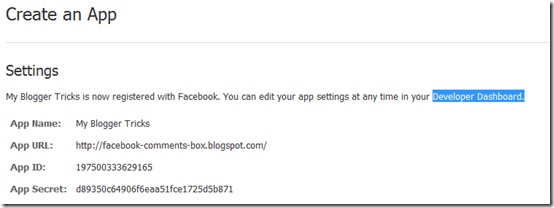
     4.   After submitting the security check code you will see this page, 
app-id
       5.   Save that FACEBOOK APP ID in a notepad because we will need that later. Now Click the link near the top-right corner of the same page that says "Developer Dashboard
image 
      6.  One the new window that appears click the Edit Settings link , 
edit-settings
        7.  Then go to Website option and write your Site Domain as blogspot 
website 
       8.  Save Changes and jump to the next step of this tutorial

Creating Tabs For Facebook Comments in Blogger

For blogger comments to display next to tabbed facebook comments, your blogger comment form settings must be set to embedded below post. To show blogger comments below posts do this:
  1. Go To Blogger > Settings > Comments
  2. Set "Comment Form Placement"  to  Embedded below post
Now follow these easy steps one by one:
  1. Go To Blogger > Design > Edit HTML
  2. Backup your template
  3. Click the "Expand widget templates" box
  4. Search for <head>
  5. Just below it add the following code,
<meta expr:content='data:blog.pageTitle' property='og:title'/>
<meta expr:content='data:blog.url' property='og:url'/>
<meta content='article' property='og:type'/>
<meta content='Blog LOGO Image Link' property='og:image'/> <meta content='FACEBOOK APP ID' property='fb:app_id'/>

<script src='http://connect.facebook.net/en_US/all.js#xfbml=1'/>
    <script src='http://code.jquery.com/jquery-latest.js'/>
    <script type='text/javascript'>
    function commentToggle(selectTab) {
      $(&quot;.comments-tab&quot;).addClass(&quot;inactive-select-tab&quot;);
      $(selectTab).removeClass(&quot;inactive-select-tab&quot;);
      $(&quot;.comments-page&quot;).hide();
      $(selectTab + &quot;-page&quot;).show();
    }
    </script>

  • Replace Blog LOGO Image Link with the image link of your blog logo. Your logo size should be as small as 30px by 30px in size. If you don't want a logo to display whenever someone shares your comment on his wall then simply delete the yellow highlighted code.
  • Replace FACEBOOK APP ID  with the numeric facebook app Id that you were asked to note down. You can find your Facebook App ID in settings page of the app you created earlier.
      6.    Search for <html and replace it with the following code,
<html xmlns:fb='http://www.facebook.com/2008/fbml'
Note: Give a space at the end of the above code.
7.  Now Search for ]]></b:skin>    and just above it paste the following CSS code,
/*--- Tabbed Facebook Comments By MBT ----*/
.comments-page {  background-color: #f2f2f2width:450px;}
    #blogger-comments-page {  padding: 0px 5px;  display: none;}
    .comments-tab { float: left; padding: 5px; margin-right: 3px; cursor: pointer; background-color: #f2f2f2;}
    .comments-tab-icon { height: 14px;  width: auto;  margin-right: 3px;}
    .comments-tab:hover { background-color: #eeeeee;}
    .inactive-select-tab { background-color: #d1d1d1;}
  • To change the background colour of tabs content area simply edit #f2f2f2
  • To change the width of the comment box container change width:450px;
8.  Next search for this
<div class='comments' id='comments'>
After the first occurrence of the above available code paste this code:
<div class='comments-tab' id='fb-comments' onclick='javascript:commentToggle(&quot;#fb-comments&quot;);' title='Comments made with Facebook'>
<img class='comments-tab-icon' src='https://blogger.googleusercontent.com/img/b/R29vZ2xl/AVvXsEiEFyQf4A-49AY2lfPFchK-URRyZqxGwcssSuYEyhb9mELA_EtQx10y-wrkFLJWuvqIJkejd6ARtLwEwVL2llQCGQJIt97fQhaYBWw2UDJ5Gw_x5UpzFTdpMu0TpTZ_8eBLeZcIeekJ-fg/s400/fbcomment.png'/>
<fb:comments-count expr:href='data:post.url'/> Comments </div>
<div class='comments-tab inactive-select-tab' id='blogger-comments' onclick='javascript:commentToggle(&quot;#blogger-comments&quot;);' title='Comments from Blogger'>
<img class='comments-tab-icon' src='http://www.blogger.com/img/icon_logo32.gif'/> <data:post.numComments/>Comments </div><div class='clear'/>
</div>

    <div class='comments-page' id='fb-comments-page'>
      <b:if cond='data:blog.pageType == &quot;item&quot;'>
       <div id='fb-root'/>
       <fb:comments colorscheme='light' expr:href='data:post.canonicalUrl' expr:title='data:post.title' expr:xid='data:post.id' width='450'/> <div style='color:#fff; background-color:#3B5998;border: solid 1px #ddd; font-size:10px; padding:3px; width:440px;'>Facebook Comments by 
<b><a href='http://www.mybloggertricks.com/' style='text-decoration:underline; color:#fff;' target='_blank' title='Blogger Widgets'>Blogger Widgets</a></b>
</div>

</b:if>
     </div>

 
Note: If the above code gave errors then delete the red highlighted lines from the code above.
  • To change the width of the comment box size change the numeric valuewidth='450' . Keep it equal to the width of the comment box container we set earlier in step#7.
  • To change the footer credits size (i.e. Facebook Comments by blogger Widgets), change this value width:440px
  • Keep a difference of 10 pixels between the comment box size and footer size. For example if you set comment box-size to width='450' then set footer-size towidth:440px
  • To change the text inside tabs edit Comments for Facebook Tab   and  Commentsfor Blogger Tab
      9.   Save your template and you are All Done!
Visit your blog to see it working just fine. :)
Note: If you have activated blogger threaded comments then the Tabs will display only when at least one comment is posted in blogger

Moderate Comments

In order to mark any comment as spam or remove/hide any comment you need to log into your facebook account and then visit this page:
You can moderate all comments at once without visiting every post in your blog and moderating comments individually for every post.

How To allow Other Login Providers

With Facebook Plugin you can choose to accept comments even with Yahoo, Hotmail or AOL. To accept comment from third part providers simply click the Settings link on Facebook comment box inside any of your post and click the checkbox that says "Other login providers"
image
other login providers
Note: The Settings link or Moderator view will only appear on your new new posts or on posts with less than 2 Facebook comments posted. There fore in order to make a one time settings, simply visit your fresh post and edit it from the facebook tab.

Credits

This tabbed commenting system has been enhanced and publicized by MBT blog by using scripts of James. If you wish to share this post with your readers then kindly link back to this post as the only favor for our efforts.

Need Help?

I am sure this post looks a little too techy but its made as easy as possible. If you ran into a trouble then just let me know by posting your query. The next part of this series will teach you how to display facebook and blogger comments count on homepage in a presentable way. Peace and blessings pals! :)

Facebook Comments Counter For Blogger - Part2


This is second part of our series on Facebook Comments plugin. Facebook comments are now optimized and easily indexed and crawled by search engines. Facebook comments appear in search results and can drive your traffic both from its 845 Million registered users and also from Mega Search engine Google. I have already shared a tutorial on how to count the number of Facebook comments and show it on your blog homepage and today we will use the same script but with a different design and feel.  Adding this comment counter is really easy. All you need to do is to track the steps properly. Please see a demo first,

Live Demo

Facebook Comments Series
Part2: Facebook Comment Counter For Blogger (Blogger + Facebook)
Par3: Optimize Facebook Comments To Increase Blog Traffic

Count Facebook Comments in Blogger

  1. Go To Blogger > Design > Edit HTML
  2. Backup your template
  3. Click the "Expand Widgets Templates" box
  4. Search for this code,
<a class='comment-link' expr:href='data:post.addCommentUrl' expr:onclick='data:post.addCommentOnclick'><b:if cond='data:post.numComments == 1'>1 <data:top.commentLabel/><b:else/><data:post.numComments/> <data:top.commentLabelPlural/></b:if></a>
    5.   The above code can occur thrice. Just replace the first occurrence of the code above with the following code:
<br/>
<div style='border-top:1px solid #ddd; border-bottom:1px solid #ddd; padding:3px 0px; text-align:right;'>
<img class='comments-tab-icon' src='https://blogger.googleusercontent.com/img/b/R29vZ2xl/AVvXsEj76Ec8ERdmmyrNLozM_Bfss5IR1wg7wFOO5hlIqDVcIwGYT5cc2_jRuCTr1Su6BQYyJ_0on4V-X4_A5dTNmupFyqKyC3nNdTIhzo2gq_vYSol6nAZphjrXxDuviXV-7rDF2VPnh4zD7pc/s400/fb.png'/>
<a class='comment-link' expr:href='data:post.addCommentUrl'><fb:comments-count expr:href='data:post.url'/> Comments</a>
<img class='comments-tab-icon' src='http://www.blogger.com/img/icon_logo32.gif'/> <a class='comment-link' expr:href='data:post.addCommentUrl' expr:onclick='data:post.addCommentOnclick'><b:if cond='data:post.numComments == 1'>1 <data:top.commentLabel/><b:else/><data:post.numComments/> <data:top.commentLabelPlural/></b:if></a>
       6.  Next search for   and just above it paste the following CSS line;
.comments-tab-icon { height: 14px;  width: auto;  margin-right: 3px;}
       7.   Save your template and you are all done!
Visit your blogs and you will see Facebook comments Count along with blogger comments count for each post between two horizontal borders.

Troubleshooting

If you needed any help just let me know. I hope this part was less techy compared to the previous one. If you need any assistance then just post your query. I know I am too lazy at replying quickly but I will surely answer every query asked. Peace and blessings dear brothers. :)

 
Related Posts Plugin for WordPress, Blogger...